
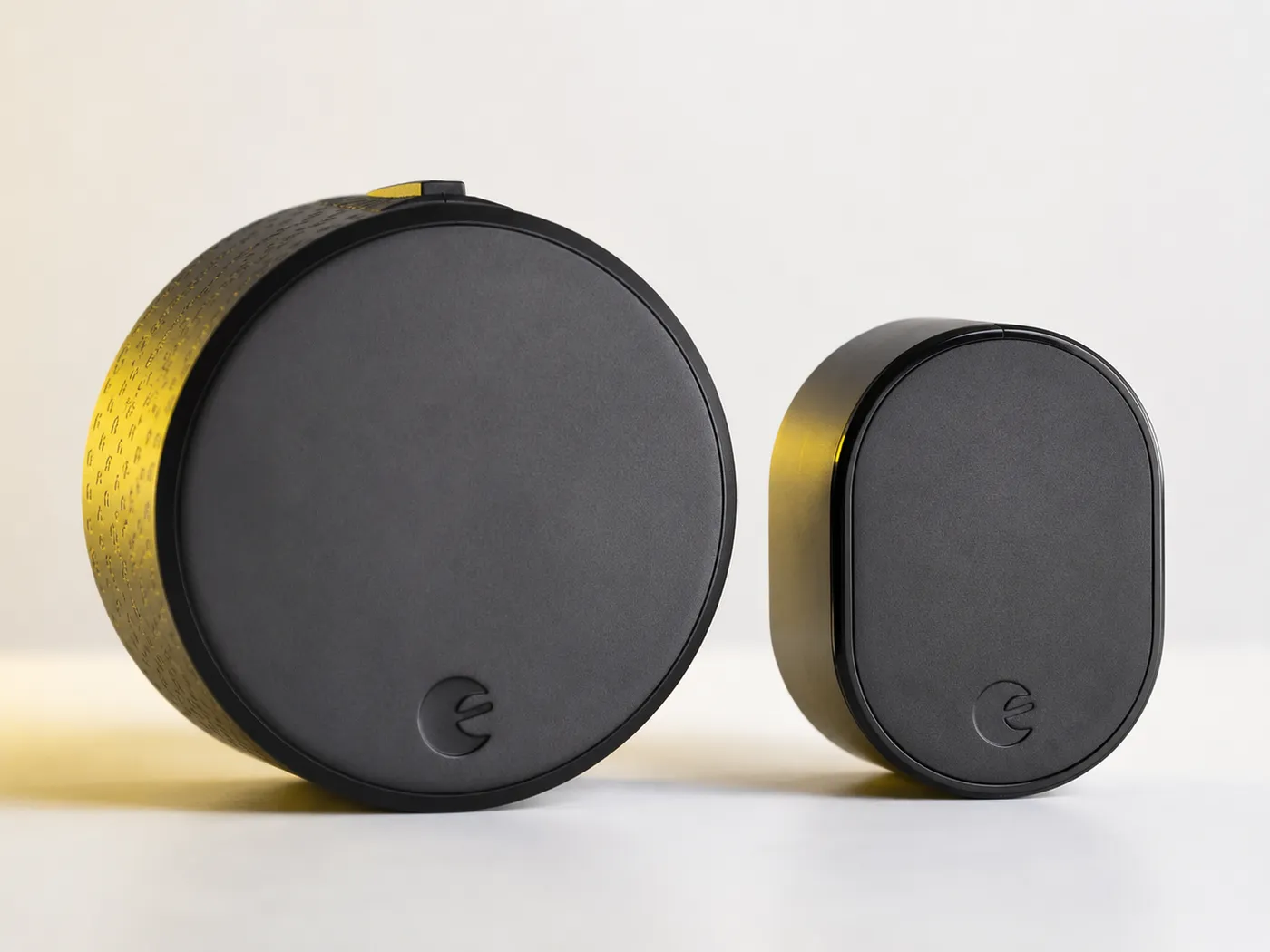
If you own an August Smart Lock Pro 3rd Generation and you have been wondering whether to upgrade to the newer 4th Gen August Wi-Fi Smart Lock, you are asking the right question. The differences are now well understood, the trade-offs are clear, and we have installed both versions in enough NYC apartments to tell you exactly when the upgrade makes sense and when it does not.
Short answer: for most NYC apartment owners with a working 3rd Gen lock, the 4th Gen is worthwhile only if you have not yet bought an August Connect bridge, or if your bridge is causing connectivity headaches. If your 3rd Gen setup works reliably and you already own the bridge, the upgrade is a nice-to-have rather than a need-to-have.
Quick Answer: 3rd Gen or 4th Gen?
- Upgrade to the 4th Gen if you do not yet own a Connect bridge, your bridge is failing, or you want native Apple HomeKit without bridge dependency.
- Stick with the 3rd Gen if your setup works, you value longer battery life, or you use Z-Wave for property management.
- The 4th Gen is 45% smaller and has built-in Wi-Fi — but battery life drops from 9–12 months to 3–6 months.
- For first-time buyers starting from scratch, the 4th Gen is the smarter purchase in 2026.
- Both generations still receive firmware updates from August as of 2026.
Need help installing either generation? Rainbow Locksmith NY installs both across all NYC boroughs. Call 212-879-5516 anytime.
You do not already own an August Connect bridge, your bridge is unreliable, you want a smaller lock, or you want HomeKit and Wi-Fi without bridge dependency.
Your current setup works, you own the Connect bridge, you value battery life over compact size, or you specifically want the 4-AA format that lasts twice as long.
August is now owned by ASSA ABLOY (same parent company as Yale and Schlage). Both generations are still supported with firmware updates as of 2026, but new feature development is focused on the 4th Gen and future generations.
At a Glance: Side-by-Side Comparison
Quick comparison of the two generations, with the winner of each category highlighted.
| Feature | Smart Lock Pro 3rd Gen | Wi-Fi Smart Lock 4th Gen |
|---|---|---|
| Current Price | $130 – $180 cheaper | $180 – $230 |
| Release Year | 2017 | 2020 |
| Built-in Wi-Fi | No (needs bridge) | Yes winner |
| Z-Wave Plus | Yes winner | No |
| Size | Larger (3.4″ dia.) | 45% smaller winner |
| Batteries | 4 AA | 2 CR123 |
| Battery Life | 9–12 months winner | 3–6 months |
| DoorSense | Yes | Yes |
| Auto-Unlock Speed | Standard | Faster winner |
| Apple HomeKit | Yes (with bridge) | Native winner |
| Install Time | 10–15 min + bridge | 8–12 min simpler |
| Renter-Friendly | Yes | Yes |
The Core Trade-Off: Size & Wi-Fi vs Battery Life
When August designed the 4th Generation, they had to make a hard engineering choice. They wanted to build Wi-Fi directly into the lock — so customers no longer need the separate Connect bridge — and make the lock significantly smaller so it would not dominate the interior of your door.
To do both, they reduced the size by 45 percent and made the lock 20 percent thinner. The trade-off was battery space. The 3rd Generation uses four AA batteries. The 4th Generation uses two CR123 batteries, which are physically smaller. Combined with the always-on Wi-Fi radio drawing more power than Bluetooth alone, the result is that the 4th Generation battery life is roughly half of the 3rd Generation.
This is the central trade-off between the two locks. Everything else flows from that single engineering decision.
Design and Build Quality
August Smart Lock Pro 3rd Gen
The 3rd Generation is the chunkier of the two. It sticks out about 2.8 inches from your door with a 3.4-inch diameter. Build quality is excellent — metal housing, fabric-textured dial ring, excellent long-term reliability. Most 3rd Gen locks installed in 2017 are still working in 2026. Available in matte black and silver. The third-party adapter ecosystem is more developed due to its longer market life.
August Wi-Fi Smart Lock 4th Gen
The 4th Generation is dramatically smaller — about 1.8 inches deep, 2.8 inches in diameter, roughly the size of a hockey puck. For tight NYC apartment doorways where the door swings into a narrow vestibule, the size reduction is genuinely meaningful. The ridged grip ring looks more modern. One under-appreciated improvement: the magnetic-snap battery cover is far easier to remove than the 3rd Gen's slide mechanism, which can stick after a few years of use.
Connectivity: The Single Biggest Difference
3rd Gen: Bluetooth + Bridge Required
The 3rd Generation has Bluetooth and Z-Wave Plus built in, but no Wi-Fi. To use the lock remotely through the August app, Apple HomeKit, Alexa, or Google Assistant, you need to plug in a separate August Connect bridge. The bridge costs $80 separately, needs a wall outlet within 30 feet of the lock, and is a single point of failure for all remote features.
In NYC apartments, this creates real challenges. Railroad-style layouts may force awkward bridge placement. Thick plaster walls degrade both Wi-Fi and Bluetooth signal. If the bridge ever fails, you lose all remote access until it is replaced.
4th Gen: Built-In Wi-Fi, No Bridge
The 4th Generation eliminates the bridge dependency by building Wi-Fi directly into the lock. Connect it to your home Wi-Fi during setup and you are done — no external hardware to position, no outlet to find, no bridge to fail. This is the headline feature that justifies most upgrades from 3rd Gen to 4th Gen.
The 4th Gen retains Bluetooth for local app control and auto-unlock. What it loses is Z-Wave Plus. For most NYC homeowners this does not matter, but for Airbnb hosts and property managers using Z-Wave-based systems, this is a reason to prefer the 3rd Gen.
NYC apartment buildings have notoriously congested Wi-Fi — thick plaster walls, steel-reinforced doors, and hundreds of competing access points. If you have a weak Wi-Fi signal at your front door, a 3rd Gen with the bridge positioned at a more central outlet may actually outperform a 4th Gen built-in Wi-Fi. Test your signal before buying.
Battery Life: 3rd Gen Wins Comfortably
3rd Gen Battery Life
Uses four standard AA batteries. With Bluetooth-only use and occasional remote access, expect 9 to 12 months of battery life. AA batteries are universally available — any NYC bodega stocks them, making emergency battery changes simple at any hour.
4th Gen Battery Life
Uses two CR123 batteries. With built-in Wi-Fi running constantly, expect 3 to 6 months of battery life. CR123 batteries are less universally available than AA — hardware stores carry them, but most NYC bodegas do not. Many 4th Gen owners switch to rechargeable CR123 batteries within the first year (~$50 for a starter set with charger).
Over a five-year period, the 3rd Gen needs 5 to 8 battery changes. The 4th Gen needs 10 to 18 with disposables. If minimizing maintenance is important to you, the 3rd Gen wins by a clear margin.
Features and App Experience
Both generations use the same August app with the same core feature set: DoorSense, auto-unlock by phone proximity, auto-lock timer, guest access codes with scheduling, activity logs, geofencing, and integration with Apple HomeKit, Alexa, and Google Home.
Where the 4th Gen Pulls Ahead
Faster auto-unlock recognition thanks to a newer Bluetooth chip. Remote app commands execute about half a second faster than the 3rd Gen with bridge. Supports more concurrent user codes and longer activity history retention. Native HomeKit is meaningfully more reliable than bridge-mediated HomeKit — automations execute faster and connection drops are rarer.
Where the 3rd Gen Holds Its Own
Slightly more customizable notification settings. Some power users prefer the 3rd Gen's granular control over which events trigger notifications. The 4th Gen simplified these settings, which is friendlier for casual users but less flexible for advanced setups.
Installation in NYC Apartments
Both generations install entirely on the interior side of your existing deadbolt. The exterior of your door remains untouched, and your landlord's key still works. This is the reason August remains our top recommendation for NYC renters.
- 3rd Gen install takes 10–15 minutes plus another 10 minutes to set up the Connect bridge. A Phillips-head screwdriver is the only tool needed. Multiple deadbolt adapters are included in the box.
- 4th Gen install takes 8–12 minutes total. No bridge to configure. CR123 batteries come pre-installed. The smaller housing is easier to maneuver in tight spaces.
- Both installs are DIY-friendly for a confident homeowner. If your deadbolt is misaligned, sticky, or non-standard, professional installation is the wiser choice.
- Rainbow Locksmith NY installs both generations throughout all five boroughs starting at $125. Free phone consultations to help you decide which to buy.
Security Considerations
Both locks have the same fundamental security profile — they both retrofit onto your existing deadbolt without changing exterior hardware. The lock cylinder, the deadbolt itself, and the strike plate are all unchanged. Someone trying to force your door faces the same physical defenses with or without an August installed.
Both generations use 128-bit AES encryption for Bluetooth communications and have undergone independent security audits. Both receive timely firmware updates from August. If anything, the 3rd Gen has a slight edge in security track record because it has been in the wild longer and any vulnerabilities have been discovered and patched over nearly a decade of real-world use.
Pros & Cons: Head to Head
- 9–12 month battery life on AA batteries
- AA batteries available at any NYC bodega
- Z-Wave Plus for property management compatibility
- Often discounted to $130–$150
- More customizable notification settings
- Bridge can be positioned for optimal signal
- Longer real-world reliability track record
- Requires Connect bridge ($80) for remote access
- 45% larger and bulkier than 4th Gen
- Bridge dependency adds a failure point
- Bridge needs outlet within Bluetooth range
- August has shifted development to newer generations
- Built-in Wi-Fi, no separate bridge required
- 45% smaller, 20% thinner than 3rd Gen
- Faster auto-unlock and remote command speed
- Native Apple HomeKit support
- Cleaner look on tight NYC apartment doors
- Easier magnetic battery cover access
- Simpler single-device install
- Half the battery life of the 3rd Gen
- CR123 batteries less universally available
- No Z-Wave Plus support
- Built-in Wi-Fi cannot be repositioned
- Higher price at MSRP
When to Upgrade — and When to Skip
Upgrade to the 4th Gen if:
- You do not own a Connect bridge yet. Buying the bridge or upgrading to a 4th Gen costs roughly the same. The 4th Gen is the cleaner long-term choice.
- Your bridge is failing or unreliable. Replacing a bridge costs $80. Sell your used 3rd Gen for $50–$80 and the upgrade economics get close to even, with a sleeker lock to show for it.
- You want native Apple HomeKit. The 4th Gen's HomeKit is meaningfully more reliable than bridge-mediated HomeKit — faster automations, fewer connection drops.
- You are buying your first August lock in 2026. Start with the 4th Gen. It is the current-generation product with integrated Wi-Fi and a smaller footprint.
Stick with the 3rd Gen if:
- Your 3rd Gen works reliably. There is no functional reason to upgrade. The 4th Gen does the same things, just slightly faster and without the bridge.
- You value the longer battery life. The 3rd Gen genuinely lasts twice as long and uses batteries you can buy anywhere at 2am.
- You use Z-Wave property management. The 4th Gen drops Z-Wave entirely. Airbnb hosts and property managers with Z-Wave PMS integrations should stay on the 3rd Gen.
- Your front-door Wi-Fi signal is weak. In older NYC pre-war buildings with plaster walls, a 3rd Gen with a bridge positioned centrally often beats the 4th Gen's built-in Wi-Fi.
Which Generation Wins by Use Case
Apartment Renters
4th Gen winsSmaller size looks better on smaller doors. No bridge means less to set up, maintain, and pack when moving.
Long-Term Owners
3rd Gen slight edgeLonger battery life means fewer maintenance interruptions over a decade. Bridge is a non-issue once set up.
Airbnb Hosts
3rd Gen winsZ-Wave Plus integrates more cleanly with property management systems used in multi-unit operations.
HomeKit Households
4th Gen winsNative HomeKit without bridge is meaningfully more reliable with better Apple Home automation integration.
Tech-Light Users
3rd Gen winsLonger AA battery life and the simplicity of swapping standard batteries beats the CR123 maintenance cycle.
Old NYC Walk-Ups
3rd Gen often winsPlaster walls and steel doors degrade Wi-Fi at the front door. A centrally positioned bridge often performs better.
Frequently Asked Questions
Need Help Installing or Upgrading Your August Lock?
Rainbow Locksmith NY installs and services both August generations throughout all five NYC boroughs. We can advise you on which to buy, install on difficult doors, or troubleshoot connectivity issues with your existing setup.
Call 212-879-5516 Now338 E 65th St, New York, NY 10065 | Open 24 Hours